
Millioner Mobile Casino: App, iPhone and Android
 Available in US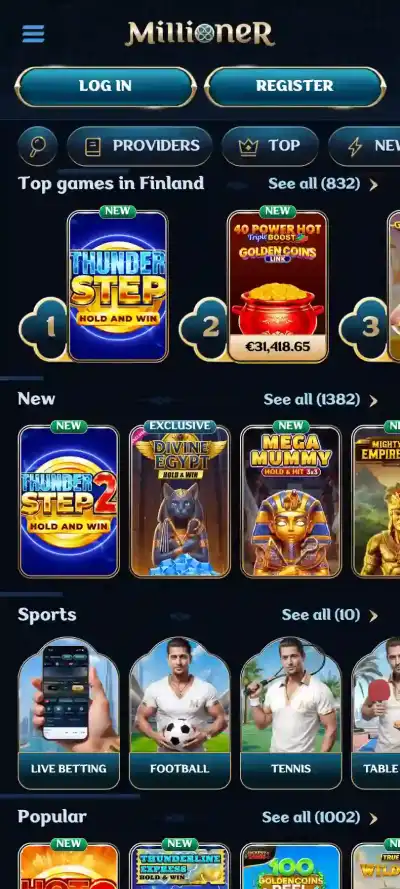
Content
Millioner does not offer a dedicated mobile app. Its official site says the service is optimised for mobile devices and presents the browser website as the mobile route instead of a separate casino application. For Australian users, the current `/au/` surface is available in a mobile-friendly format and the site includes a `Create Shortcut` option. In practical terms, iPhone and Android access is browser-based: open the official Millioner web surface in a current browser, sign in there, and optionally add a home-screen shortcut for app-like access. That shortcut is still a link to the website, not a native iOS or Android application. This distinction matters because it removes any reason to search third-party APK sites or install unofficial software claiming to be a Millioner app.
No dedicated app: what that means
Millioner’s own mobile wording is direct: the site is optimised for mobile devices and it does not have a dedicated app. The main product therefore remains the website. On a phone, the casino interface is delivered through the browser rather than through a separately installed application from an app store.
That has a simple consequence for iPhone and Android users. You do not need a special Millioner download to reach the core service. A browser session can provide the site navigation, casino categories and account entry points visible on the current web surface. The official Australia page currently shows Casino, Live Casino and Sports navigation together with login and registration controls.
A browser-based product can look and behave like an app in many everyday tasks, but it is still technically different. There is no native-app installation package to update, no separate app-store listing required for access, and no reason to treat an APK file from an unrelated download site as an official Millioner product.
iPhone access
On iPhone, the straightforward route is to open the official Millioner website in a browser and use it directly. Millioner’s shortcut instructions for iOS describe using the browser’s share control and then choosing the option to add the site to the Home Screen. The resulting icon is a shortcut that launches the website.
This can make repeat access feel more like opening an app because the icon sits with other home-screen applications. It does not change the underlying service into a native iOS app, and it should not be confused with an App Store download. Login state, browser settings and website updates still belong to the web experience.
If the shortcut stops behaving as expected, opening the site directly in the browser is the useful fallback. A shortcut can be removed and recreated without affecting the underlying Millioner account because it is only a launch path to the website.
Android access
Millioner also publishes shortcut instructions for Android. The process described on its shortcut page involves opening the site and using the browser menu to add it to the home screen when the direct install-style option does not complete the task. As on iOS, the result is a shortcut to the website rather than an independently distributed native Android app.
That distinction is particularly important on Android because APK files can be installed outside the Play Store. Millioner does not need an unofficial APK for normal mobile access. If a third-party site offers a file described as a Millioner casino app, that is not supported by the current official no-dedicated-app wording and should not be treated as the normal access method.
What is visible on the mobile web surface
The current Australia-targeted site exposes the main product categories through the same web property. Its navigation includes Casino, Live Casino and Sports, with casino subcategories such as pokies, table games and all games, plus live-casino sections including roulette, blackjack, game shows, baccarat and dice, and poker. The site also presents login, registration, help and live-chat entry points.
Visible mobile categories do not mean every game or function behaves identically on every phone. Game-provider compatibility can vary, and browsers behave differently depending on device, operating-system version and settings. Millioner uses a mobile-optimised website, and the current Australia surface exposes its principal navigation through that website.
For catalogue detail rather than mobile mechanics, use the Millioner games.
Registration and account access on mobile
Because Millioner’s service is browser-based, account creation and sign-in are web functions rather than app-only processes. The current site exposes Register and Log in controls on the main surface. Millioner’s registration page also presents welcome-bonus choices and an option to continue without a welcome bonus.
The underlying account rules do not change because you use a phone. Registration information still needs to be accurate, and the one-account rule still applies. For the account process itself, see the Millioner registration.
Verification can also become part of the mobile account journey. If Millioner requests KYC information, the important issue is whether the requested evidence is complete and readable, not whether it was submitted from a desktop or phone. Exact KYC requirements and timing belong in the dedicated verification guide rather than being repeated here.
Payments on mobile
The mobile site is an access layer to the same account, not a separate wallet with different verified rules. Payment methods available to an individual account can change over time and may depend on the cashier view presented to that user. There is no separate fixed mobile-only payment list; the methods shown in the live cashier can depend on the account and current routing.
For Australian readers, the more useful payment questions are whether AUD is supported, which methods are actually shown in the account, and what withdrawal rules apply. Those topics are covered in the Millioner payments guide, where method and currency context can be treated separately from the mobile interface.
Browser shortcut versus native app
| Feature | Millioner browser shortcut | Native app |
|---|---|---|
| What it launches | The official Millioner website in a browser or browser-powered window | Separately installed application software |
| Installation source | Created from the browser’s home-screen option | Normally an app store or official distribution package |
| Millioner status | Supported by the site’s Create Shortcut guidance | No dedicated Millioner app is currently stated by the official site |
| Updates | Website changes appear through the web service | App packages can require separate updates |
The shortcut is useful for convenience, but it does not create a new product. If you delete the shortcut, you can still reach Millioner through the browser. If a site asks you to download a separate package while claiming it is required for Millioner mobile play, that is inconsistent with the current official browser-based model.
How to verify you are using the official mobile route
Start from the known Millioner web domain rather than from a download directory, social-media file link or APK catalogue. For this Australia-focused guide, the verified localised surface is the `/au/` path on the Millioner domain. A home-screen shortcut should resolve back to the official site rather than to a separate software-download host.
Also distinguish a web prompt such as Add to Home Screen from a request to install an unknown Android package. The former creates a shortcut or web app-style launcher; the latter installs software on the device. Because Millioner currently says it has no dedicated app, there is no need to take the second route for ordinary access.
Mobile security basics
A browser-based casino still handles account credentials and potentially sensitive account information, so ordinary web security matters. Use the official site, keep the browser and operating system current, and avoid saving credentials on a shared device. If you use a home-screen shortcut, create it yourself from the official site so you know where it points.
Do not treat an app-like icon as proof that software came from Millioner. A shortcut can be given almost any name, and unofficial sites can imitate branding. The useful check is the destination domain and the fact that Millioner’s own product description points users to its mobile-optimised website.
Performance expectations without invented benchmarks
Millioner describes the website as optimised for mobile navigation, but its public material does not provide a universal loading-time benchmark, minimum device specification or frame-rate guarantee. Performance can vary by device, browser, network and game.
Real performance depends on the browser, device resources, connection quality and the game or live-casino stream being opened. If one title performs poorly, that does not automatically show that the entire mobile site is incompatible. Conversely, a fast homepage does not guarantee that every provider’s game will behave the same way.
Mobile access to casino, live casino and sports
The current Australia page exposes casino, live casino and sports navigation on the mobile-capable website. That means the browser is not presented as a reduced information-only version of the brand. It is the principal access route to the product categories Millioner currently displays.
The detailed catalogue changes over time and belongs on the casino games and pokies guide. The important mobile point is that a dedicated application is not required to reach these top-level areas.
Should you add a shortcut?
A shortcut is useful if you visit the site regularly and want one-tap access from the home screen. It does not provide a separate account, special game catalogue or verified payment advantage. Its benefit is convenience.
If you prefer not to create one, a bookmark or normal browser history works just as well for reaching the site. The safest choice is whichever method keeps you on the official domain and avoids unofficial software downloads.
Mobile takeaway for Australian users
For the complete brand-level context, see the Millioner Australia review. The current official position is straightforward: Millioner is mobile optimised but does not have a dedicated app. iPhone and Android users access the service through the website, and Millioner provides a home-screen shortcut process for faster repeat access. The Australia-targeted `/au/` surface displays the major casino, live-casino and sports areas, while account and payment functions remain part of the browser service. The main practical warning is to avoid unofficial app or APK downloads that are unnecessary for the product Millioner currently describes.
This material was created by the Millioner Australia Guide team.
Related posts
Millioner Casino Reputation and Complaints
Millioner Withdrawals: Limits, Times and Verification